
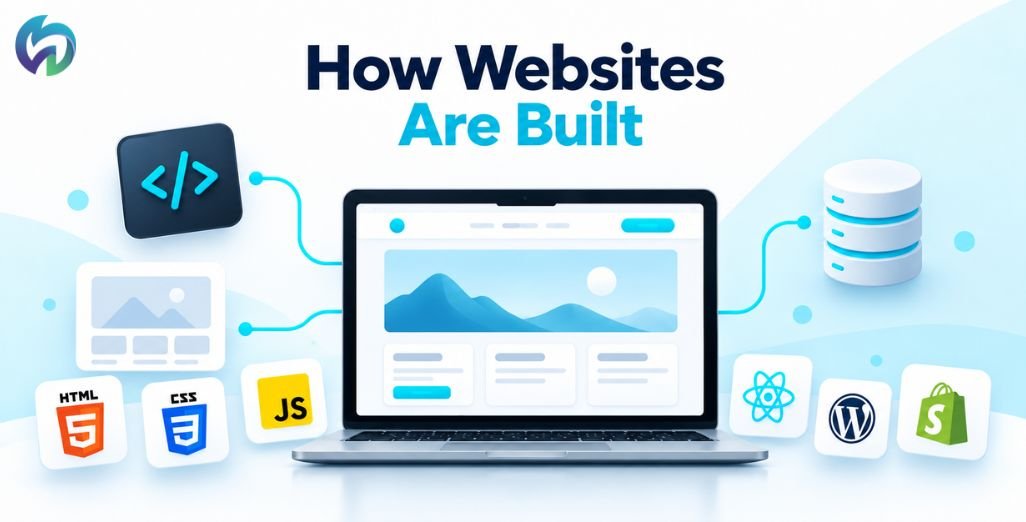
Have you ever wondered what goes into building a website? You open a page, browse products, fill out a form, or make a payment, and everything seems to happen effortlessly.
But behind that experience are different technologies working together.
Some websites are built using programming languages and frameworks, while others rely on content management systems like WordPress or website builders like Webflow.
If you’re planning a website for your business or exploring web development, understanding these technologies can help you make better decisions.
Let’s explore how websites are actually built, from designing the first layout to choosing the right development platform.
How Does a Website Actually Work?
Imagine visiting an online clothing store. You browse products, choose a size, add something to your cart, and complete your purchase.
Three important components may be involved:
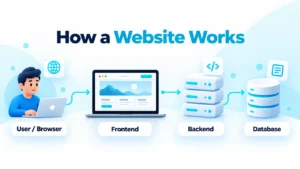
- Frontend: Everything visitors see and interact with, including images, buttons, and menus.
- Backend: The systems processing orders, user accounts, payments, and other requests.
- Database: Stores information such as products, customers, and orders.
When you visit a website, your browser requests information from a server, which responds with the necessary content.
Not every website needs a complicated backend or database. A simple informational website can work using static files.
Website Design: Creating the User Experience
Before development begins, designers plan how visitors will interact with the website.
UI design focuses on colors, typography, layouts, and visual elements. UX design focuses on making the website easy to navigate and understand.
For example, a restaurant website should make its menu, location, and booking information easy to find.
Designers commonly use Figma for layouts and prototypes, Photoshop for editing images, and Illustrator for creating visual graphics.
Responsive design is equally important, ensuring websites work across mobiles, tablets, and desktops.
Frontend Technologies: HTML, CSS, and JavaScript
Most websites rely on three foundational technologies.
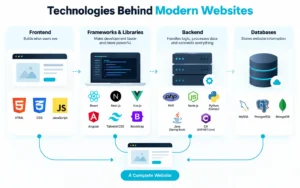
HTML structures content, including headings, images, paragraphs, and links.
CSS controls appearance, such as colors, spacing, fonts, and responsive layouts.
JavaScript adds interactive functionality, including dropdown menus, sliders, and dynamic content.
Developers also use libraries and frameworks for more complex projects.
- React: A JavaScript library for interactive user interfaces.
- Angular: A framework for structured web applications.
- Vue.js: A flexible framework for building interfaces.
- Next.js: A React framework with additional rendering and development capabilities.
- Bootstrap and Tailwind CSS: Tools that simplify styling and responsive layouts.
These technologies are useful, but a straightforward business website doesn’t necessarily require an advanced framework.
Backend Technologies and Databases
The backend handles activities visitors don’t directly see.
Common technologies include PHP, Node.js, Python with Django, Java with Spring Boot, and C# with ASP.NET Core.
Databases such as MySQL, PostgreSQL, and MongoDB organize information.
For example, when customers place orders, backend systems may update inventory, save transaction details, and communicate with payment services.
Content Management Systems and Website Builders
Not every website needs to be coded from scratch.
A content management system (CMS) allows businesses to manage website content without editing the underlying code every time.
There are six major platform categories worth understanding.
1. Traditional CMS Platforms
Traditional CMS platforms generally combine content management with website presentation.
WordPress.org is widely used for blogs, business websites, and ecommerce projects. Its themes and plugins provide considerable flexibility.
Other options include:
- Drupal: Suitable for complex websites and institutional requirements.
- Joomla: Supports structured content and user permissions.
- Craft CMS: Offers precise control over custom content and templates.
- TYPO3: Often used for multilingual and enterprise websites.
These platforms work well when regular content updates and flexible management are priorities.
2. Headless and API-First CMS
Unlike traditional systems, a headless CMS separates content management from presentation.
For example, a company can manage content centrally and display it on its website, mobile application, and other digital platforms.
Popular platforms include:
- Contentful: Enterprise content infrastructure.
- Sanity: Customizable structured content and editing.
- Strapi: Open-source headless content management.
- Storyblok: Visual editing with headless delivery.
- Kontent.ai: Enterprise content operations.
- Directus: Database-connected content management with APIs.
Headless CMS platforms provide flexibility but may require greater development expertise.
3. Visual and No-Code Website Builders
Some businesses prefer building websites visually without managing complex infrastructure.
Webflow offers visual design tools and content management, while Framer is often used for interactive marketing websites.
Wix and Wix Studio provide drag-and-drop or visual editing with customization options. Squarespace offers polished templates and integrated website features.
Hostinger Website Builder, SITE123, and GoDaddy Website Builder provide simpler options for getting online.
These platforms can save setup time, although customization and portability vary.
4. Specialized Ecommerce Platforms
Online stores require product management, inventory tracking, checkout systems, and payment integrations.
Popular ecommerce technologies include:
- Shopify: A hosted platform for managing online stores.
- BigCommerce: Supports multichannel and B2B ecommerce.
- Adobe Commerce and Magento Open Source: Options for highly customized commerce requirements.
- WooCommerce: An ecommerce extension for WordPress.
A small retailer may prefer Shopify’s managed environment, while larger businesses may need more specialized functionality.
5. Flat-File and Publishing Platforms
Some publishing platforms reduce reliance on traditional database-driven content management.
Ghost focuses on blogging, newsletters, and memberships.
Statamic is a Laravel-based CMS supporting flat-file and database-based content storage.
Grav is a flat-file CMS that can operate without a database.
These platforms can suit publishers, documentation projects, and teams looking for different content management workflows.
6. Enterprise Digital Experience Platforms
Large organizations often manage multiple brands, websites, marketing campaigns, and customer experiences.
Digital Experience Platforms, or DXPs, help coordinate these activities.
Adobe Experience Manager offers enterprise content and digital asset management.
Sitecore provides digital experience and content management solutions.
HubSpot Content Hub integrates website content with HubSpot’s broader CRM and marketing ecosystem.
These platforms are usually intended for organizations with more complex operational requirements.
Hosting, Security, and Website Performance
Once a website is developed, it needs a domain name and hosting to become available online.
Security measures such as HTTPS, backups, software updates, and access controls help protect the website and its users.
Performance is equally important. Google’s Core Web Vitals measure loading performance, responsiveness, and visual stability.
Optimized images, efficient code, reliable hosting, and thoughtful design can make websites more comfortable to use.
How Is a Website Built From Start to Finish?
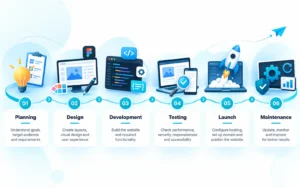
Most professional website projects follow a similar process:
- Planning: Understand business goals, visitors, and requirements.
- Design: Prepare layouts and user experiences.
- Development: Build the website and required functionality.
- Testing: Check responsiveness, security, performance, and accessibility.
- Launch: Configure hosting and publish the website.
- Maintenance: Update, monitor, and improve the website.
Developers may also use Git, GitHub, Google Lighthouse, and AI-assisted coding tools during development.
However, automated tools cannot replace careful planning, testing, and human judgment.
Which Technology Should You Choose for Your Website?
The right technology depends on what your business actually needs.
A local restaurant may only need a WordPress website displaying its menu, location, and contact details.
An online fashion store might benefit from Shopify or WooCommerce.
A company developing a customer portal may need custom frontend and backend technologies.
Before choosing, consider your budget, required features, content management needs, maintenance, and future growth.
The most advanced technology isn’t always the most practical one.
Frequently Asked Questions
Can I build a website without coding?
Yes. WordPress, Shopify, Wix, and other website builders allow users to manage many website features without coding knowledge.
Is WordPress better than React?
They serve different purposes. WordPress is a CMS, while React is a JavaScript library. The better option depends on your project.
Which website technology is best for SEO?
No technology guarantees better rankings. Search-friendly structure, useful content, accessibility, mobile usability, and website performance matter more.
How much does website development cost?
Costs depend on design complexity, features, integrations, and maintenance requirements. A basic business website usually costs less than a complex custom application.
Final Thoughts: Choosing the Right Technology for Your Website
Building a website isn’t just about choosing WordPress, React, Shopify, or the latest development framework. It’s about understanding your business requirements and selecting technologies that make your website easy to use, secure, and manageable in the long run.
A small business website may not need complicated functionality, while an ecommerce store or growing company might require a more advanced solution. What matters most is choosing the right technology without adding unnecessary costs or complexity.
However, with so many technologies, platforms, and frameworks available, deciding where to begin can be challenging, especially if you’re building your first website.
That’s where Nevtrino can help.
As a Website Development Agency in Dehradun, we help businesses build professional, responsive, and easy-to-manage websites that match their goals and budgets.
We believe website development should be transparent and straightforward. That’s why we take the time to understand your requirements, explain the available options, and keep you informed throughout the development process.
Whether you need a business website, an ecommerce store, or a custom web solution, our focus is on delivering a website that looks professional, works smoothly, and supports your business as it grows.
Because at the end of the day, a successful website isn’t about using the most advanced technology. It’s about choosing the right technology to achieve your business goals.