
You spent hours planning your video, recording it, editing every little detail, and finally uploading it to YouTube. You expected at least a few hundred views, but after several days, the number is still disappointingly low.
Sound familiar?
You’re certainly not the only one facing this problem. Many YouTube creators and businesses struggle to get their videos noticed, even when they’ve put genuine effort into creating good content.
The frustrating part is watching another video on a similar topic receive thousands of views while yours barely reaches an audience.
So, what’s going wrong? Is it your content, your video title, your thumbnail, or YouTube’s algorithm?
The answer isn’t always straightforward.
Increasing YouTube views isn’t just about uploading more videos. It’s about understanding what people want to watch, helping them discover your content, and giving them a reason to stay.
Whether you’re starting your first YouTube channel, trying to revive an existing one, or using YouTube to promote your business, this guide will help you understand what works.
We’ll discuss how YouTube recommends videos, practical ways to increase your views, the best tools for YouTube SEO, common mistakes to avoid, and how businesses can turn YouTube into a useful marketing channel.
Let’s start with something every creator should understand.
1. Understand How the YouTube Algorithm Works
Before trying different techniques to increase YouTube views, you need to understand how YouTube decides which videos to show people.
You may have heard creators saying things like:
“My channel is dead because of the algorithm.”
“YouTube isn’t promoting my videos anymore.”
“The algorithm only supports big creators.”
These statements might reflect someone’s frustration, but they don’t explain how YouTube actually works.
YouTube’s recommendation system is designed to help viewers discover videos they’re likely to enjoy.
It considers things like what people watch, what they ignore, how long they continue watching, and whether they appear satisfied with the experience.
For creators, three areas are particularly important.
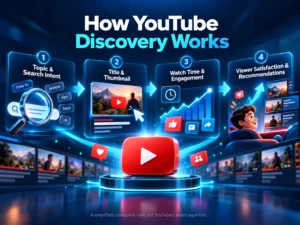
Appeal: Does someone want to watch your video?
Imagine you’re searching YouTube for a tutorial on improving your phone’s battery life.
You see two videos:
- Video A: “My New Video About Mobile Phones”
- Video B: “7 Phone Settings That Could Be Draining Your Battery”
Which one would you choose?
Most people looking for battery-saving tips would find the second title more helpful because it clearly explains what they’ll learn.
Your title, thumbnail, and topic help viewers decide whether your video deserves their attention.
Engagement: Do people continue watching?
Getting someone to click is only the beginning.
If your video promises useful information but spends the first two minutes on an unrelated introduction, some viewers will leave.
YouTube can observe how viewers respond to your content, including how much they watch.
This is why making an interesting video matters more than simply attracting clicks.
Satisfaction: Was the video worth watching?
Think about the last YouTube video you genuinely enjoyed.
Perhaps you watched another video from the same creator, shared it with a friend, or subscribed to the channel.
That kind of positive viewer experience is what creators should aim for.
The important lesson: Don’t create videos only to please an algorithm. Create videos your intended audience would genuinely want to watch.
2. Find Video Topics People Are Already Searching For
One of the biggest mistakes beginners make is choosing topics without checking whether anyone is interested in them.
You might have excellent editing skills and a great camera, but if your topic doesn’t interest your target audience, getting views will be difficult.
This is where proper YouTube keyword research can help.
Start with YouTube’s search suggestions
Open YouTube and begin typing a topic related to your channel.
For example, if you have a cooking channel, type:
“How to make pizza”
You might discover suggestions related to making pizza without an oven, homemade pizza dough, or preparing pizza using simple ingredients.
These suggestions can help you understand common searches and give you ideas for more specific videos.
However, search suggestions don’t tell you the exact monthly search volume.
Explore questions your audience asks
Suppose you run a fitness channel.
Instead of publishing random workout videos, look for questions such as:
- How can beginners start exercising at home?
- What exercises can someone do without equipment?
- How can people improve their running stamina?
- What are common workout mistakes?
A beginner who needs help with these problems is more likely to appreciate a video that explains them clearly.
You can find ideas through YouTube comments, Google searches, online communities, customer enquiries, and conversations with your audience.
Check competing videos
Search for the topic you’re considering and examine the videos already appearing.
Pay attention to their titles, thumbnails, upload dates, and the questions viewers ask in comments.
Then think about what you could explain better.
Maybe an existing tutorial is outdated, skips an important step, or assumes viewers already understand technical terms.
That could be your opportunity.
You don’t need to copy another creator. You need to find a way to make your content more useful.
3. Write YouTube Titles That Make People Want to Click
Your video title is one of the first things a potential viewer notices.
A good title should accomplish two things:
- Help people understand what the video is about.
- Give the right audience a reason to watch it.
Let’s look at a simple example.
Weak title: “YouTube Tips for Everyone”
Better title: “How to Get More YouTube Views on a Small Channel”
The second title identifies a specific problem and tells viewers what they can expect.
Here are a few more examples:
| General title | More specific title |
|---|---|
| My Camera Review | Is This Budget Camera Worth Buying in 2026? |
| Learn Excel | 10 Excel Formulas Every Beginner Should Know |
| Website Tips | 7 Website Mistakes That May Be Costing You Customers |
| Travel Vlog | What to Know Before Visiting Mussoorie |
| SEO Tutorial | How to Find SEO Keywords for a New Website |
Notice that the improved titles are clearer, not necessarily more dramatic.
Should you add keywords to YouTube titles?
Yes, when they fit naturally.
If your video teaches people how to increase YouTube views, using that phrase in your title can help make its relevance clear.
But avoid repeating the same keyword several times.
For example, a title like “YouTube Views, Increase YouTube Views, Get More YouTube Views Fast” looks unnatural and doesn’t explain much.
Focus on clarity, accuracy, and the viewer’s search intent.
Also, don’t promise something your video doesn’t deliver. Misleading titles can attract clicks, but disappointed viewers may leave quickly.
4. Create YouTube Thumbnails That Stand Out
Imagine walking through a bookstore where hundreds of books are displayed.
Even before reading their titles, certain covers catch your attention.
YouTube thumbnails work similarly.
Your thumbnail helps viewers decide whether to stop scrolling and consider your video.
You don’t need an expensive graphic designer or complicated artwork to make a useful thumbnail.
A few basic principles can make a difference.
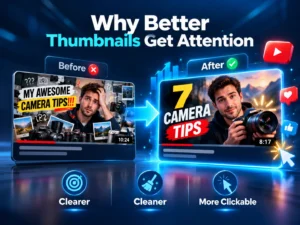
Keep your thumbnail simple
Avoid filling every corner with text, arrows, emojis, and unnecessary images.
Someone using YouTube on a mobile phone should still be able to understand your thumbnail.
For example, a video about improving photography might show a clear before-and-after comparison rather than ten different camera images.
Make the subject obvious
If you’re reviewing a laptop, show the laptop clearly.
If you’re explaining a software feature, consider highlighting the relevant part of the interface.
If your video focuses on a particular location, a well-composed photograph may communicate more than a large block of text.
Use readable text when necessary
You don’t always need text on a thumbnail.
But if you include it, use a few meaningful words that support the title instead of repeating the entire title.
Test different thumbnails
YouTube Studio now offers eligible creators the ability to test different title and thumbnail combinations.
You can compare up to three variations on supported videos, and YouTube uses watch time to help determine which version performs best.
Rather than guessing which design people prefer, this feature gives creators a way to learn from actual viewer behaviour.
Remember, a thumbnail should attract the right audience, not mislead people into watching something unrelated.
5. Improve the First 30 Seconds of Your Video
You may have experienced this yourself.
You click on an interesting video, but the creator spends the opening minute asking viewers to subscribe, explaining their personal history, and talking about things unrelated to the title.
You lose interest and move to another video.
The opening of your video is a valuable opportunity to convince viewers that they’ve made a good choice.
Let’s say you’re creating a video about reducing website loading time.
Instead of beginning with:
“Hello everyone, welcome back to my channel. Today I have another amazing video, and before we begin, please subscribe…”
You could start with:
“Is your website taking too long to load? In this video, I’ll show you five common reasons websites become slow and what you can do about them.”
The second introduction immediately addresses the viewer’s problem.
That doesn’t mean every video needs to begin with a dramatic statement.
A travel vlog, documentary, tutorial, and product review will naturally have different openings.
What matters is making the first moments relevant and interesting.
How to keep viewers watching
Try these practical techniques:
- Get to the main topic without unnecessary delays.
- Explain concepts using real examples.
- Remove sections that don’t add value.
- Use relevant visuals when they make something easier to understand.
- Maintain a comfortable pace.
- Make sure the video delivers what the title promises.
You don’t need to make every video short. You need to make the time people spend watching worthwhile.
6. Optimize Your YouTube Video Description
A YouTube description helps viewers understand your video and gives you space to provide additional information.
It can also help YouTube understand the video’s context.
However, writing a very long description filled with repeated keywords isn’t a useful strategy.
Start with a short, natural explanation of what the video covers.
For example, if your video is about WordPress website speed optimization, you could write:
Example YouTube description:
“Is your WordPress website loading slowly? In this video, we’ll look at common reasons WordPress websites become slow and explain practical ways to improve their performance. You’ll learn about image optimization, caching, plugins, and other factors that can affect website speed.
If you’re managing a WordPress website and want to improve the experience for your visitors, this guide will help you understand where to begin.”
You can follow this with useful timestamps, related resources, and relevant website links.
What should a YouTube description include?
Include the main topic naturally, briefly explain what viewers will learn, and add relevant information that supports the content.
For tutorials, timestamps can make longer videos easier to navigate.
If you mention a tool or resource, you can link to its official page.
If your video is intended to generate business enquiries, include an appropriate call to action.
For example:
“Need professional help improving your business website? Visit Nevtrino.com to learn about our website development and digital marketing services.”
The description should be useful even if someone ignores the promotional links.
7. Do YouTube Tags and Hashtags Still Matter?
You’ll find many tutorials claiming that adding the right tags can make a video go viral.
Unfortunately, things aren’t that simple.
YouTube explains that tags play a relatively small role in video discovery. They can be useful when a subject is commonly misspelled, but they aren’t the main reason videos receive recommendations.
For most creators, spending hours finding dozens of tags isn’t a good use of time.
A better approach is to focus first on the topic, video quality, title, thumbnail, and description.
You can still include a few relevant tags or hashtags when appropriate.
For example, a video about WordPress SEO might use:
#WordPressSEO #SEOTips #WordPressTutorial
Don’t add unrelated trending hashtags just to attract attention.
Remember that your goal is to reach people interested in your content, not simply collect more impressions.
8. Use YouTube Shorts to Reach New Viewers
YouTube Shorts can be useful for creators who want to experiment with shorter videos and introduce their content to new audiences.
You don’t necessarily need separate ideas for every Short.
Sometimes, a useful moment from an existing long-form video can become a standalone piece of content.
For example, imagine you publish a 15-minute video titled “How to Improve Your Website’s SEO.”
You could create Shorts explaining:
- One common SEO mistake beginners make
- Why website speed matters
- How to write a better page title
- What an SEO-friendly URL looks like
Each Short should provide something useful on its own.
You can also connect eligible Shorts to a related long-form video so interested viewers have somewhere to continue learning.
Are Shorts better than long-form videos?
Neither format is automatically better.
Shorts can be useful for quick explanations, entertaining moments, and reaching viewers who enjoy short-form content.
Long-form videos give you more room to explain complicated topics, demonstrate products, compare solutions, and build trust.
For businesses, combining both formats can be effective.
For example, a real estate company might publish a complete property walkthrough and then create several Shorts highlighting individual features.
However, not everyone who watches a Short will watch a longer video or subscribe to your channel.
Treat the two formats as connected opportunities rather than expecting identical results.
9. Encourage Viewers to Watch More of Your Videos
Getting someone to watch one video is valuable.
Helping them discover another relevant video can make your channel more useful.
Suppose you run a channel about learning graphic design.
Someone watches your tutorial on designing a logo.
At the end, you could recommend a related video about choosing brand colours or designing a business card.
That recommendation makes sense because it supports what the viewer is already learning.
Create playlists around related topics
Instead of organising every video randomly, group related content into useful playlists.
For example:
Playlist: Learn SEO for Beginners
- What Is SEO and How Does It Work?
- How to Find Keywords for Your Website
- How to Write SEO-Friendly Content
- How to Optimize Website Images
- How to Measure SEO Performance
This structure helps interested viewers find the next relevant lesson.
You can also use YouTube’s end screens and cards where the features are available.
Avoid recommending unrelated videos simply because they have more views.
10. Best YouTube SEO Tools to Help Increase Views
You don’t have to manage every part of your YouTube channel manually.
Several tools can help with research, optimization, design, editing, and performance analysis.
But there’s something worth understanding before exploring them.
No YouTube SEO tool can guarantee more views.
These tools are useful because they help you make better decisions, save time, and understand your audience.
Here are some worth considering.
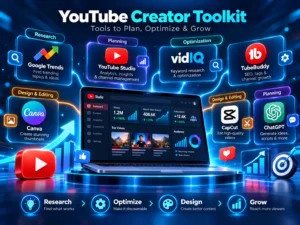
1. YouTube Studio
Website: https://studio.youtube.com/
YouTube Studio should be the starting point for every creator because it provides direct information about your own channel.
You can use it to examine how people find your videos, which content receives attention, and where viewers stop watching.
Useful features include:
- Video performance analytics
- Audience retention reports
- Impressions and click-through rates
- Traffic source information
- Audience insights
- Topic research through available Trends features
- Title and thumbnail testing for eligible videos
For example, if a video receives plenty of impressions but very few clicks, you may want to investigate its title and thumbnail.
If people click but leave early, you should examine whether the opening delivers what they expected.
YouTube Studio helps you identify these problems instead of making random changes.
Best for: Beginners, established creators, and businesses managing YouTube channels.
Pricing: Free.
2. vidIQ
Website: https://vidiq.com/
vidIQ is a popular YouTube optimization platform that helps creators research topics, explore keywords, and plan content.
Its features include keyword suggestions, competition estimates, video ideas, and channel analysis.
For example, if you’re planning a video about home workouts, vidIQ may help you explore related topics and understand which ideas appear competitive.
However, keyword volume and difficulty estimates from third-party tools shouldn’t be treated as exact YouTube search figures.
Use them as research signals rather than guaranteed predictions.
Best for: Creators who want additional help with keyword research and content planning.
Pricing: Free and paid options, depending on the features required.
3. TubeBuddy
Website: https://www.tubebuddy.com/
TubeBuddy offers tools for channel optimization and management.
It can assist with keyword research, video metadata, workflow management, and other repetitive activities.
This can be particularly helpful if your channel already contains many videos.
For example, you may want to review outdated descriptions, compare video performance, or manage optimization tasks more efficiently.
TubeBuddy and vidIQ offer overlapping capabilities.
You don’t necessarily need to pay for both.
Compare the features you actually need before choosing a subscription.
Best for: Creators managing growing or established channels.
Pricing: Free and paid options.
4. Google Trends
Website: https://trends.google.com/
Google Trends is a useful research tool for identifying how interest in particular topics changes over time.
Where available, you can select YouTube Search to explore relevant search-interest trends.
Imagine you run a travel channel.
You might compare interest in different destinations, travel activities, or seasonal travel topics.
This can help you plan videos around questions people are more likely to be exploring.
Google Trends provides relative interest data, not exact search volumes.
Best for: Topic comparisons, seasonal content planning, and exploring changing audience interests.
Pricing: Free.
5. Canva
Website: https://www.canva.com/
Canva is useful for designing thumbnails, channel banners, and other visual assets.
You can create your own designs or begin with templates and customize them for your content.
If you’re a beginner without advanced design experience, it can make the creative process easier.
However, don’t assume every template will work equally well for your audience.
Your thumbnail should still reflect the video and remain readable on smaller screens.
Best for: YouTube thumbnails and channel branding.
Pricing: Free and paid options.
6. CapCut
Website: https://www.capcut.com/
CapCut offers video editing tools that can help creators prepare clips, subtitles, and short-form content.
Its editing features may be useful for improving pacing, removing unnecessary footage, and creating vertical videos.
Availability and certain features can vary by country and plan.
Alternatives include DaVinci Resolve, Adobe Premiere Pro, and other video editing software.
Best for: Video editing, particularly short-form content where available.
7. ChatGPT
Website: https://chatgpt.com/
AI tools like ChatGPT can support the planning and research process.
For example, you can use ChatGPT to:
- Brainstorm video topics
- Organise a video outline
- Generate alternative titles
- Identify questions viewers might ask
- Simplify technical explanations
- Draft a video description
- Plan a content calendar
Suppose you’re creating a video explaining digital marketing to beginners.
You could ask ChatGPT to organise your existing knowledge into a clear 10-minute video outline with examples suitable for a young audience.
You should still check facts, review the suggestions, and add your own experience.
An AI-generated script isn’t automatically accurate, original, or engaging.
Best for: Brainstorming, content planning, and writing assistance.
Which YouTube SEO tool should you choose?
If you’re just beginning, start with YouTube Studio, Google Trends, and a design tool such as Canva.
Once you understand your channel’s needs, you can evaluate vidIQ or TubeBuddy.
If you publish frequently, a reliable editing workflow may save more time than another keyword research subscription.
The best combination depends on your content, budget, experience, and the problems you’re trying to solve.
11. Promote Your YouTube Videos Outside YouTube
Uploading your video and hoping people discover it isn’t your only option.
You can introduce your content to relevant audiences through other platforms.
For example, if you publish a tutorial about designing a business website, you could share it with people discussing website development.
You might also embed the video in a related blog article.
Here are a few ways to distribute your content.
Share videos on social media
Platforms such as Instagram, Facebook, and LinkedIn can help you introduce your videos to people who already follow your work.
Rather than posting only a YouTube link, explain why the video is useful.
For example:
“Planning to redesign your business website? We recently covered five mistakes that can make a website difficult to use. Here’s the complete explanation.”
This gives people a reason to consider watching.
Add relevant videos to your website
If you have a website or blog, embedding a useful YouTube video can give visitors another way to understand the topic.
For example, a written guide about website development could include a video demonstrating how a responsive website behaves on mobile and desktop screens.
The video should complement the article instead of distracting readers from what they came to learn.
Use email newsletters
If people have subscribed to receive updates from you, share relevant educational videos occasionally.
A business offering marketing advice might send a useful tutorial along with a brief explanation of why readers may benefit from watching it.
Participate in relevant communities
Online communities can help you understand what people are struggling with.
When appropriate and allowed by community rules, you can share videos that genuinely answer someone’s question.
Avoid posting the same link everywhere or sending unsolicited promotional messages.
Promotion is more useful when it introduces helpful content to the right people.
12. Learn How to Read YouTube Analytics
If you’re serious about growing your channel, don’t judge every video by views alone.
YouTube Analytics contains information that can help you understand what’s working and what needs improvement.
Let’s look at some useful measurements.
Impressions
Impressions tell you how often your video thumbnail was shown in eligible places on YouTube.
If your video receives very few impressions, investigate the topic, competition, traffic sources, and how viewers are responding.
Low impressions don’t automatically mean YouTube is restricting your channel.
Click-through rate (CTR)
CTR helps you understand how often people watch after seeing a registered thumbnail impression.
For example, if a video receives 1,000 registered impressions and 50 of those lead to views, the CTR would be 5%.
But don’t treat 5% as a universal target.
CTR differs across audiences, topics, traffic sources, and stages of a video’s growth.
A video reaching a broader audience may naturally experience a lower CTR.
Average view duration
This indicates how long viewers watch your video on average.
For example, if you publish a 10-minute tutorial and viewers typically leave after one minute, it’s worth reviewing the beginning of the video.
Maybe the introduction takes too long, or the video doesn’t immediately deliver what the title promises.
Audience retention
Audience retention helps you understand which parts of a video hold attention and where people stop watching.
Look for moments where viewers leave in large numbers.
Then review what happens during those sections.
Was the explanation unclear?
Did the video suddenly move away from the main topic?
Did you spend too long repeating something?
Use the information to improve your next video.
Traffic sources
Traffic sources show where viewers discover your videos.
Some may arrive through YouTube Search, while others find your content through suggested videos, browsing, external websites, or other sources.
Understanding these differences can help you develop a more suitable content strategy.
Returning viewers
Returning viewers can help you understand whether people are developing an ongoing interest in your content.
A channel that consistently answers related questions may give viewers more reasons to return.
It’s worth studying these patterns over time rather than reacting emotionally to every daily change.
13. Why Are Your YouTube Videos Not Getting Views?
Sometimes you’ve followed the basic recommendations, but your videos still aren’t performing as expected.
That doesn’t necessarily mean your content is bad.
There could be several explanations.
You’re targeting a very competitive topic
A new technology channel might struggle to attract attention with a broad video titled “Best Smartphones.”
Established publications and creators may already serve a large audience interested in that subject.
Instead, you could explore more specific topics, such as comparing two smartphones for a particular use case.
That gives your video a clearer audience.
Your thumbnail doesn’t communicate the topic
You might have recorded a helpful tutorial, but if your thumbnail is cluttered or confusing, some people may scroll past it.
Review how your thumbnail appears on mobile devices.
Can someone understand the main idea within a moment?
Your introduction takes too long
If viewers leave shortly after clicking, compare the title’s promise with the opening of the video.
Deliver the important information sooner.
You’re creating videos for different audiences
Suppose your channel publishes gaming videos, cooking tutorials, business advice, and travel vlogs without a clear connection.
Some subscribers might enjoy one topic but ignore the others.
A focused channel doesn’t have to publish identical videos forever, but a recognisable purpose can help viewers understand what to expect.
You’re following trends unrelated to your audience
Publishing a trending topic might occasionally attract additional attention.
But if the topic has little connection to what your regular viewers enjoy, those views may not help you build an interested audience.
Choose trends that make sense for your content.
You’re expecting results too quickly
Not every video performs immediately.
Some videos may continue attracting viewers through search or recommendations after their publication date.
Instead of repeatedly deleting and uploading the same video, study the available performance data and consider whether a meaningful improvement is needed.
Building a successful channel usually involves experimentation, learning, and patience.
14. How Businesses Can Use YouTube to Attract Customers
So far, we’ve focused largely on increasing YouTube views.
But what if you’re a business owner?
Should you invest time and money in YouTube when you already have a website, social media pages, and other marketing activities?
For many businesses, the answer can be yes, provided YouTube serves a clear marketing objective.
Here’s why.
When people are considering a product or service, they often want more information before making a decision.
They may want to see how something works, understand the process, compare options, or learn whether a company seems trustworthy.
Video content can help answer those questions.
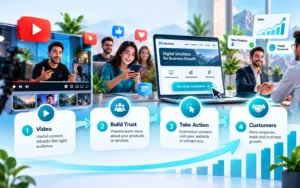
Build trust before someone contacts you
Let’s imagine you own a hotel in Mussoorie.
A potential guest might be interested in booking a room but want to know what the property looks like.
You could publish videos showing the rooms, views, amenities, nearby attractions, and travel information.
These videos help people understand what to expect.
If they find the information useful, they may feel more comfortable enquiring about a booking.
Demonstrate your products and services
If you sell products online, videos can explain features that photographs or text descriptions might not communicate clearly.
For example, a furniture company could demonstrate how a particular product looks in a room, how it is assembled, or how its materials differ from other options.
A manufacturing company could show aspects of its production process, quality checks, or product applications.
For business buyers, such videos can help answer important questions before a sales conversation.
Educate potential customers
Consider a company offering logistics services.
Instead of publishing only advertisements, it could create videos explaining shipping documents, common customs-related questions, or how to prepare goods for international transportation.
These videos may attract people researching the same problems the company helps solve.
Educational content allows businesses to demonstrate useful knowledge without making every video a sales pitch.
Reach customers in different locations
A YouTube video can be discovered by people beyond your immediate city or country.
This may be useful for businesses offering services internationally.
For example, a company providing website development, digital marketing, or consulting services could create content answering questions from prospective customers in India, the USA, Canada, Germany, Australia, or other target markets.
However, simply uploading a video doesn’t guarantee international reach.
The language, topic, relevance, and audience response still matter.
Turn interested viewers into enquiries
Getting thousands of views can feel exciting, but views don’t always lead to business.
Suppose a company receives 50,000 views from people who aren’t interested in its services.
Another video might reach only 2,000 people, but some of those viewers are actively researching a service the company provides.
The second video could potentially create more business opportunities.
This is why businesses should measure outcomes beyond view counts.
Useful measurements may include website visits, enquiries, booked consultations, qualified leads, and sales.
For businesses, the goal isn’t always to become famous on YouTube. It’s to become easier for potential customers to discover, understand, and trust.
15. Should You Use YouTube Ads to Increase Reach?
Organic YouTube growth takes time, and results are never guaranteed.
For businesses with a marketing budget, YouTube advertising can provide another way to reach relevant audiences.
Google Ads offers campaign types that can distribute video advertising across YouTube and other eligible placements.
Demand Gen campaigns, for example, can support certain engagement and conversion objectives.
Depending on eligibility and campaign configuration, advertisers can also measure or optimize for YouTube channel subscriptions and follow-on views.
However, advertising needs a clear objective.
If you’re promoting a new product, your priority might be reaching potential buyers.
If you’re building awareness of your business, you might focus on introducing your brand to a relevant audience.
If your main goal is generating leads, the website experience and conversion measurement become especially important.
Paid promotion doesn’t automatically make your future organic videos rank higher.
It’s simply another marketing approach that can work alongside useful organic content.
Before spending money, consider your target audience, campaign goals, creative quality, budget, and how you’ll measure results.
16. Common YouTube Growth Mistakes You Should Avoid
As your channel grows, you’ll probably discover endless tips claiming to help you get more views.
Some are helpful.
Others can waste your time or even put your channel at risk.
Here are several practices worth avoiding.
Buying fake YouTube views and subscribers
You might come across websites promising thousands of views or subscribers for a small payment.
Be careful.
YouTube prohibits artificial increases in views, likes, subscribers, and other engagement metrics.
Using services that violate these rules can result in enforcement actions against your content or channel.
Even if artificial engagement increases a displayed number temporarily, it doesn’t create a genuinely interested audience.
Using misleading titles and thumbnails
A thumbnail showing something unrelated to the video might attract attention, but it can disappoint viewers.
Aim to make people curious about the actual content you’re offering.
Copying content without adding value
Researching other creators is normal.
Copying their ideas, scripts, designs, and presentation without meaningful originality is not a sustainable strategy.
Consider what you can contribute through your own research, examples, explanation, or experience.
Spending too much time on tags
Tags aren’t a substitute for a good topic or video.
Spend more effort making your content useful and understandable.
Ignoring analytics
Without reviewing your performance data, you might continue making the same mistakes.
Use analytics to guide improvements, but avoid becoming obsessed with every small fluctuation.
Uploading frequently at the cost of quality
You don’t need to publish every day simply because another creator does.
Choose a schedule you can realistically maintain while producing useful content.
Consistency is valuable when it helps you serve your audience reliably.
17. How Nevtrino Can Help Improve Your YouTube Growth Strategy
Understanding YouTube optimization is one thing. Finding the time to research topics, plan videos, improve titles and thumbnails, study analytics, and promote content is another.
For an individual creator, managing everything can become overwhelming.
For a business owner, YouTube may be only one part of a much larger marketing plan.
That’s where Nevtrino can help.
Nevtrino is a digital marketing agency based in Dehradun and Mussoorie, Uttarakhand, serving businesses across India and international markets.
We understand that increasing views is only part of the bigger picture.
What matters is reaching people who are genuinely interested in your content, products, or services, and building a digital presence that supports your long-term goals.
Understanding your channel before recommending changes
Every YouTube channel is different.
A new creator struggling to reach their first audience needs a different strategy from an established business trying to generate enquiries through educational videos.
Instead of applying the same approach to everyone, the process should begin by understanding your existing content, target audience, competition, and objectives.
Finding better content opportunities
Choosing relevant topics is one of the most important parts of YouTube growth.
With proper keyword research and content planning, Nevtrino can help businesses identify subjects connected to what their potential customers want to learn.
For example, a company offering website development services might benefit from tutorials explaining website costs, design mistakes, or the differences between popular website platforms.
These topics can attract people who may eventually need professional assistance.
Improving how videos are presented
Sometimes a useful video struggles because its title doesn’t clearly explain its value or its thumbnail doesn’t attract the intended audience.
Reviewing these elements, together with descriptions and channel organisation, can help uncover potential improvements.
There is no guarantee that changing a title or thumbnail will increase views, but informed testing is more useful than making random adjustments.
Connecting YouTube with your wider marketing strategy
Your YouTube channel shouldn’t necessarily work in isolation.
A useful video may support a blog article, introduce people to your business website, or provide educational content for a social media campaign.
This is where Nevtrino’s broader digital marketing capabilities become valuable.
From website development and SEO to social media marketing and paid advertising, the goal is to connect the different parts of your online presence.
For a business, this means looking beyond individual video performance and understanding how YouTube contributes to marketing and customer acquisition.
Transparency matters
At Nevtrino, we believe businesses should understand what is being done and why.
Marketing shouldn’t feel like a complicated process where you pay for a service but have no idea what happens afterward.
Our approach emphasises clear communication, practical recommendations, and transparency about the work involved.
We also understand the importance of budgets, especially for small businesses and growing brands.
You don’t need promises of overnight success. You need an approach that makes sense for your goals and resources.
Whether you’re exploring YouTube for the first time or looking for ways to improve an existing channel, you can speak with Nevtrino about your challenges and the support you need.
Want to reach more relevant viewers and turn your YouTube presence into a business opportunity?
Visit https://nevtrino.com/ to explore our digital marketing services and get in touch with our team.
Frequently Asked Questions About Increasing YouTube Views
How can I increase YouTube views for free?
Start by creating videos around topics your audience is interested in. Improve your titles, thumbnails, and introductions, and use YouTube Studio to understand how viewers respond. You can also share relevant videos through your website, social media accounts, and communities where promotion is appropriate.
How can I get my first 1,000 views on YouTube?
Focus on a specific audience and a useful topic rather than chasing a particular number. Research common questions, make an informative video, give it a clear title and thumbnail, and share it with relevant viewers. Study the results and apply what you learn to future uploads. There is no guaranteed method or timeline for reaching 1,000 views.
Does YouTube SEO really work?
YouTube SEO can help videos become easier to understand and discover through search. Relevant titles, descriptions, content, and viewer engagement all matter. However, optimization alone cannot guarantee rankings or recommendations.
Which tool is best for YouTube SEO?
YouTube Studio is the best place for most creators to begin because it provides direct channel performance data. Google Trends can help with topic research, while third-party tools such as vidIQ and TubeBuddy provide additional research and management features.
Can I increase YouTube views without subscribers?
Yes. People can discover your videos through search, recommendations, Shorts, and external sources even if they haven’t subscribed to your channel. A small subscriber count doesn’t automatically prevent a video from reaching new viewers.
How many videos should I upload every week?
There is no universal number that works for every channel. Choose a schedule that allows you to create useful content consistently. Publishing fewer well-planned videos may be more practical than rushing to upload every day.
Do YouTube Shorts help grow a channel?
Shorts can introduce your content to new viewers and help you explore different topics and formats. However, viewers who enjoy Shorts won’t necessarily watch your longer videos or subscribe. Give them relevant opportunities to explore more of your content.
Can changing a YouTube thumbnail increase views?
It can, especially if a new thumbnail communicates the video’s value more effectively. But results depend on how viewers respond. YouTube’s native testing tools can help eligible creators compare different options.
How long does it take to grow a YouTube channel?
There is no fixed timeline. Growth depends on audience demand, competition, content quality, consistency, and viewer response. Rather than expecting a specific number of subscribers within a few weeks, review your progress and focus on steady improvements.
Can YouTube help small businesses get customers?
Yes, YouTube can help businesses explain their services, demonstrate products, answer customer questions, and build trust. To generate measurable business results, videos should reach relevant viewers and provide a clear next step, such as visiting a website or making an enquiry.
Should I hire a YouTube marketing agency?
Professional support may be useful if you don’t have the time, resources, or experience to manage research, optimization, promotion, and analytics yourself. Before hiring an agency, understand its proposed services, reporting approach, fees, and realistic expectations. Avoid anyone guaranteeing artificial views or instant success.
Final Thoughts: Focus on Building an Audience, Not Just Getting Views
Increasing YouTube views can feel challenging, especially when you’ve invested time and effort into content that hasn’t performed as expected.
But getting more views isn’t about discovering one secret trick.
It’s about understanding who you’re creating content for, choosing topics they care about, making videos they want to watch, and learning from how they respond.
Start with small improvements.
Research your next video topic before recording. Write a clearer title. Try a more understandable thumbnail. Review where viewers lose interest. Give people a reason to explore your other videos.
You don’t need to change everything at once.
And if you’re a business owner, remember that YouTube success doesn’t always mean becoming a popular creator with millions of subscribers.
Sometimes, success means a potential customer discovering your business, understanding what you offer, and deciding to contact you.
That’s the kind of growth worth working toward.
Need help improving your online visibility and connecting your content with your business goals?
Nevtrino supports businesses with digital marketing, SEO, website development, social media marketing, and advertising strategies. Explore our services at https://nevtrino.com/ and start a conversation about what your business wants to achieve.